"Word opened fine this morning, so is Office 2021 really dead, and do I have to pay for a new one?" Start with the one check that tells you whether this affects you at all. Open Word, click File, then Account, and read the product name under Product Information. If it ends in 2021, the Office 2021 end of support date of 13 October 2026 is yours, and it has now passed. If it says Microsoft 365, you are on a subscription and nothing has changed for you.
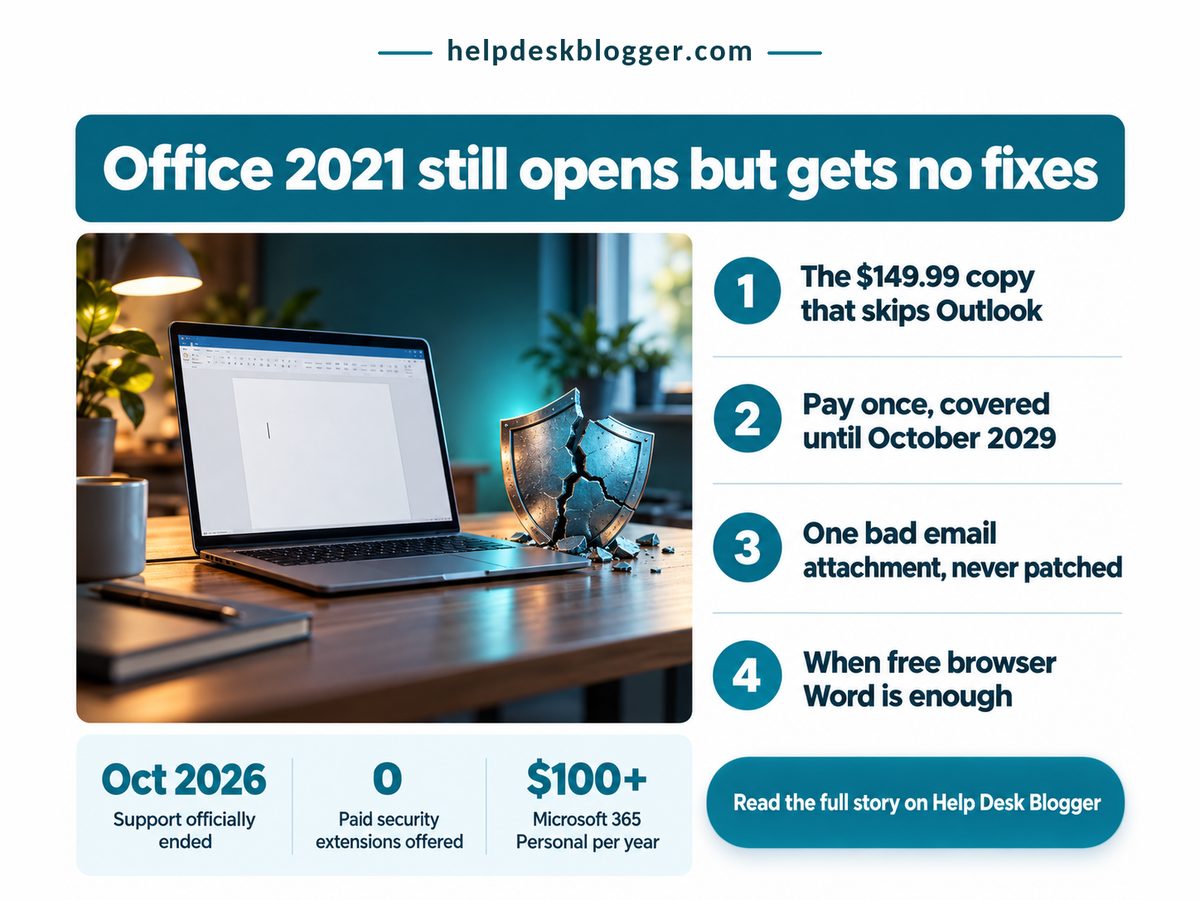
Still here? Then check what has actually stopped. Nothing on your screen changes. Everything underneath it does.
Key Takeaways: you do not have to pay today, but staying on Office 2021 now means staying unpatched.
- Office 2021 still opens; fixes and support stopped on 13 October 2026, with no paid extension.
- On one PC without desktop Outlook, a one-time Office 2024 licence is the cheapest paid exit.
- Microsoft 365 Personal outspends that licence after about 18 months.
- Light users can move to the free browser apps and stay patched.
What Office 2021 end of support changes on your PC
The change is invisible: Office 2021 apps still open and save your files, but Microsoft stopped every security fix and every form of technical help for them on 13 October 2026, and it is not selling an extension.
Microsoft's own End of support for Office 2021 notice, updated in June 2026, is blunt: there is "no extension and no extended security updates." That is the sharp difference from Windows 10, where Microsoft does sell extra patches, as our guide to checking your Windows 10 ESU enrolment through October 2027 explains. Here there is no lifeline to buy. Staying means staying unpatched.
In practice the danger arrives by email. A booby-trapped Word attachment built around a flaw found next spring will work against your copy for good, because no patch is coming.
But the notice also says your apps "may continue to function," so panic-buying makes no sense. I'd push back on the usual advice to upgrade immediately: work out which exit fits, then take it within weeks.
It is the second Microsoft deadline in a fortnight, after the Windows 11 24H2 cutoff and its one-restart fix, and the pattern repeats: the software runs while the risk grows.
Four numbers from Office Watch's June 2026 rundown decide which exit is cheapest. They are US list prices; no verified UK price was available at writing, so check Microsoft's UK store before paying.
Office 2024 Support Ends
Oct 2029
About three years of fixes
Office Home 2024, Once
$149.99
No desktop Outlook included
Free Browser Office Apps
3
Patched without paying anything
Microsoft 365 Personal
$100+ a year
Renews every single year
The support date on the replacement matters more than its price. Buying Office 2024 does not end this question, it postpones it to the end of the decade, when the same choice returns.
Windows 10 owners could pay for more patches. Office 2021 owners cannot, so every month on the old copy is a month with no fixes at all.
Should I buy Office 2024 or Microsoft 365?
For a single PC, a one-time Office 2024 licence costs less than Microsoft 365 over its support life, even in the Outlook tier, and the subscription earns its price mainly in households sharing three or more PCs.
The table lines up the two paid routes, cost first. Staying put with the free browser apps is the third route, and it sits in the final row.
| Dimension | Office 2024 vs Microsoft 365 | What it means for you |
|---|---|---|
| 💰 Outlook cost | Office 2024 Home and Business, about $100 more Microsoft 365 Included in every plan |
⚠️ Desktop Outlook users need the dearer tier |
| 💰 Three-year cost | Office 2024 Paid once, nothing after Microsoft 365 Personal: $300+ by 2029 |
✅ One PC keeps roughly half its spend |
| ⏱ Break-even | Office 2024 Flat from day one Microsoft 365 Dearer after about 18 months |
⚠️ Decides it if you keep Office past 2028 |
| 📊 Several PCs | Office 2024 One licence per PC Microsoft 365 Family: $130+ a year |
⚠️ Three or more PCs tilt it to Family |
| 🔒 Security fixes | Office 2024 Patched to its end date Microsoft 365 Patched while you pay |
✅ Either route closes the attachment risk |
| ⚖️ Work PCs | Office 2024 Your IT team decides Microsoft 365 Your IT team decides |
❌ A personal purchase may be wasted |
| 🏁 Best suited for | Office 2024 One home PC, kept for years Microsoft 365 Three or more home PCs |
🏁 Letters and light sums: free web apps |
The right-hand column says it plainly: the subscription pays only when shared. My view, against Microsoft's own pitch, is that a one-PC home renting Microsoft 365 just to keep Word patched is overpaying.
If you expect to still be using Word in spring 2028, buying Office 2024 once costs less than paying for Microsoft 365 Personal year by year. Dates are from Microsoft and Office Watch; the April 2028 crossover is this article's own arithmetic from the two list prices above.
Can I still use Office 2021 after end of support?
Yes, you can keep using Office 2021 for as long as it runs, but it is only a sensible choice on a home PC where you rarely open attachments from strangers and already have a plan to move.
The quiet winner for many readers is the free browser versions of Word, Excel and PowerPoint, patched by Microsoft on its own servers. They lack some desktop features, which rarely matters for letters and a household budget.
Waiting sounds clever and mostly isn't. Office Watch calls a new one-time Office "likely but not confirmed," so you would be betting on an unannounced product while unpatched. Patches misfire too, as the Windows 11 September update faults showed, but a buggy fix beats no fix, or at least it does once the follow-up lands.
- On a shared family PC, anyone's careless click hits your unpatched copy.
- On a work or school laptop, Microsoft says follow your IT department.
- If a reinstall fails to activate, no Microsoft support line will help.
- Holding out for the next one-time Office means waiting unpatched.
Check these about your own setup before you pay anything
- Strangers' attachments reach you weekly: move off Office 2021 this month.
- You use desktop Outlook daily: price Home and Business, not Office Home.
- Three or more people at home need their own PC: price Microsoft 365 Family.
- An employer or school issued the laptop: ask IT first.
- None apply: run the browser apps for a fortnight before spending.
Pay or stay? For most single-PC homes the answer is pay once or go free, not subscribe. Tonight, open File, then Account in Word, and if the name ends in 2021, pick your exit before the weekend: browser apps for light use, Office 2024 for one PC, Microsoft 365 only for a shared household.
No comments:
Post a Comment
Note: Only a member of this blog may post a comment.