October 25, 2026

Secure Boot Certificate: 3-Step PC Check

Windows Security shows a green tick beside Secure Boot, yet every headline says a certificate ran out. Both can be true, and that gap is the whole problem. Microsoft's Windows Production PCA 2011 expired on 19 October 2026, and the secure boot certificate that replaces it may or may not be on your PC. You can find out in about a minute, in three places, checked in order.
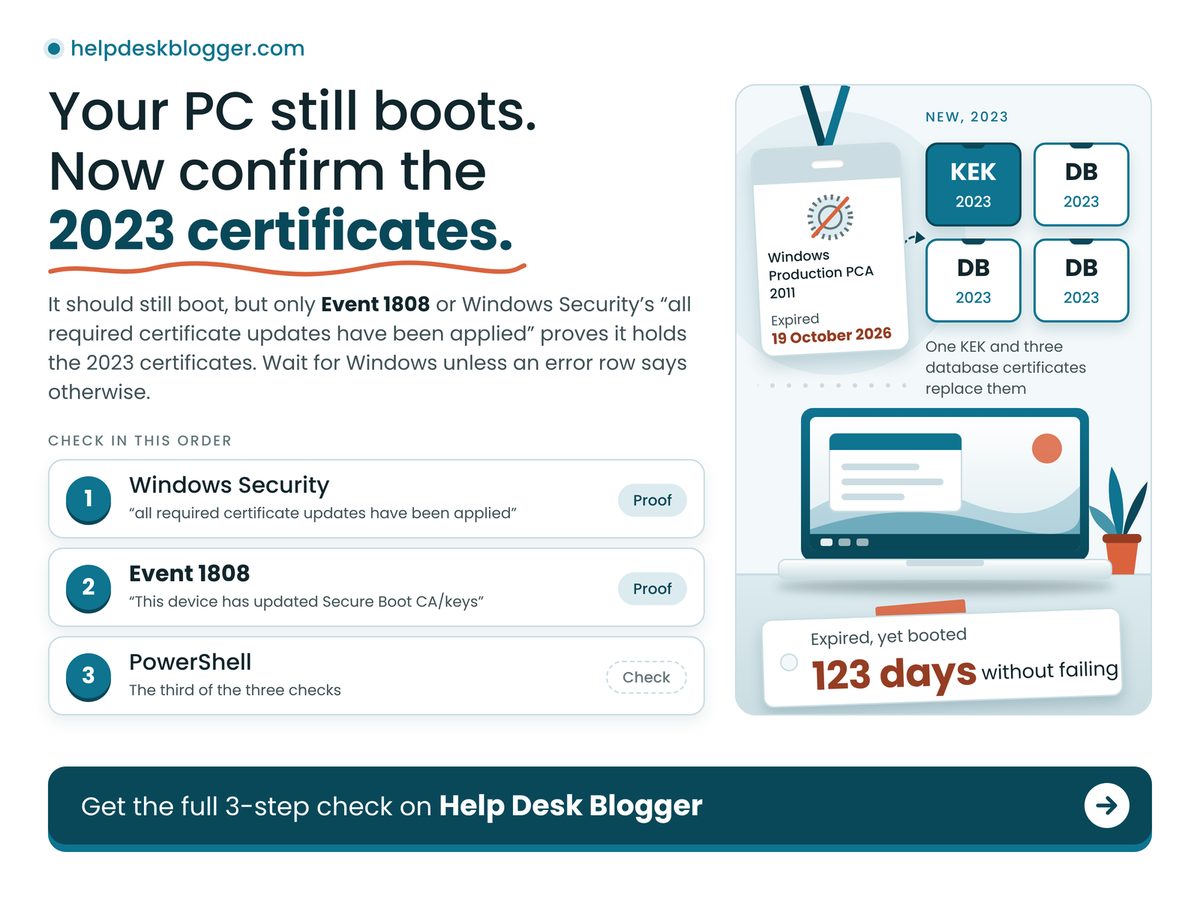
Laptop beside an expired certificate badge and four new 2023 secure boot certificate cards

TL;DR: Your PC should still boot, but only Event 1808 or Windows Security's "all required certificate updates have been applied" proves it holds the 2023 certificates.

  • Read the words in Windows Security, not the colour of the tick.
  • Event 1808 means finished; Event 1801 means staged but not yet in the firmware.
  • A missed update costs future boot-level protection, not today's startup.
  • Save your BitLocker recovery key before any firmware update.

How do I check if my PC has the Secure Boot certificate update?

Run three checks in order and stop at the first clear answer: the exact wording in Windows Security, Event 1808 or 1801 in Event Viewer, then one registry value read in PowerShell.

  1. Windows Security. Open Device security, then Secure Boot, and read the sentence under the badge. On Microsoft's status page, "all required certificate updates have been applied" means no action, while "older boot trust configuration" means install updates and restart.
  2. Event Viewer. In the System log, filter for source TPM-WMI. Event 1808, "This device has updated Secure Boot CA/keys," is the all-clear. Event 1801 means certificates updated but not yet applied to firmware, per Microsoft's events list.
  3. PowerShell. In an administrator window, run Get-ItemProperty HKLM:\SYSTEM\CurrentControlSet\Control\SecureBoot\Servicing | Select-Object UEFICA2023Status, UEFICA2023Error. Microsoft's registry page treats Updated with an error of 0 as finished; NotStarted or InProgress means not yet.

That is the one-minute check to run on your own PC tonight, and step one alone is not enough. Malwarebytes wrote on 28 May 2026 that a green checkmark alone does not confirm the new certificates were applied. An asker on Microsoft's Q&A site wanted to know how to confirm the fix had worked, which says plenty about the signal, or maybe just how many people share the question.

Will my PC still boot now the 2011 certificates have expired?

Yes: Microsoft says devices without the 2023 certificates continue to start and operate normally, and ordinary Windows updates still install, so an expired date alone does not lock you out.

What stops is the early-boot side. Microsoft states that such a PC can no longer receive new Boot Manager updates, Secure Boot database and revocation-list updates, or fixes for newly found boot-level flaws. Our reading: maintenance, not emergency, but with no natural reminder, so it gets skipped. The fix arrives through Windows Update, so confirm your build with the Windows 11 24H2 winver check, and if updates keep failing, start with the September Windows 11 update problems.

Worked example: a Windows 11 PC with Secure Boot on has never logged Event 1808, and still holds its factory 2011 certificates. Today is 25 October 2026. The key-exchange certificate expired on 24 June 2026, so 24 June to 24 October is 30 + 31 + 31 + 30 = 122 days, plus one to reach today: 123 days. That PC has booted through 123 days of an expired certificate without failing, so expiry alone is not the risk; the missing 2023 certificates are.

Four numbers frame the urgency, and the retry schedule comes from Microsoft's troubleshooting guide.

Time Since Last Expiry

6 days

Derived: nothing broke on day one

Expiry Dates Now Behind You

3 deadlines

No date left to wait for

Update Task Retry Interval

12 hours

Windows keeps retrying without you

Recovery Keys To Locate First

1 key

Needed if BitLocker prompts

The retry cadence makes patience a fair first move: a PC showing Event 1801 may simply be mid-way.

"

Expired does not mean broken. The real cost of skipping this is every boot-level fix Microsoft ships from here on, not this morning's startup.

What does each result mean, and what should I do?

Find your row and read across: 1808 means finished, 1801 means restart and recheck, errors 1795 and 1796 point at the firmware, and 1032 means pause BitLocker first.

If you seeDo thisBecause
Event 1808Nothing. You are done.Firmware holds the 2023 certificates
Event 1801Restart, then recheckStaged, but not yet in firmware
Errors 1795, 1796Look for an OEM BIOS updateFirmware refused the write; Windows retries
Event 1032Suspend BitLocker firstUpdate would trigger recovery mode
Nothing loggedInstall updates, restart, recheckTask runs at startup and repeatedly

Only the error rows need a human: Microsoft says to contact the device maker for 1795, and 1032 sits with your BitLocker setup.

1 + 3 KEK 25% Database 75%

Three of the four new certificates go into the Secure Boot database and one into the key list that authorises database changes, so a PC that finished one step is not finished. Derived from the certificate table on Microsoft's expiry page: one KEK 2K CA 2023 and three database certificates, led by Windows UEFI CA 2023.

Does the Secure Boot update trigger BitLocker recovery?

It can: Microsoft logs Event 1032 when your BitLocker setup would trigger recovery mode if the update were applied, and its fix is to suspend BitLocker for two restarts, then turn it back on.

Microsoft also notes a device may ask for the recovery key once after the update; enter it and check for firmware updates. Windows Latest reported on 26 May 2026 that HP had acknowledged a BIOS update leaving some commercial PCs in a BitLocker recovery loop, with the 2023 certificates failing to install meanwhile. Our call: treat every firmware update on a BitLocker PC as a recovery-key moment, and store the key somewhere that is not that PC.

One poster on Microsoft's Q&A forum described a status stuck at InProgress with events 1796 and 1801 repeating, an update that keeps retrying and never lands.

  • Secure Boot off. A PC in legacy BIOS or CSM mode, Malwarebytes reports, sits outside this update.
  • Reset to defaults. Microsoft says avoid it unless the maker's defaults include the 2023 certificates.
  • Dismissed warnings. Dismiss installs nothing, and Microsoft calls it not recommended.
  • Windows 10. Microsoft's expiry page lists Windows 10 22H2, so run the same three checks; patch timing is in the Windows 10 ESU extension to October 2027.

Stop and ask the maker before changing anything if:

  • Your PC is an HP commercial model with a BIOS update waiting.
  • You cannot say where your BitLocker recovery key is saved.
  • Windows Security shows the red stop icon and mentions the manufacturer.
  • UEFICA2023Error still holds a non-zero number after several restarts.

The decision is whether to wait for Windows or step in yourself, and for most PCs it is wait. Tonight, run the three checks. At Event 1808, close the laptop. Otherwise install updates, restart, recheck tomorrow, and touch firmware only once your recovery key is saved off the PC.

How we checked this

We read four Microsoft pages: the certificate expiry page (change log to 18 May 2026), the Secure Boot events list, the Windows Security status page (revised 3 April 2026) and the registry key page (change log to 20 March 2026). The worked example is our own date arithmetic, assuming the PC kept its 2011 certificates. No PC was tested hands-on for this article. Last verified: 25 October 2026.

Edited by Ragu, reviewed after publication. Spotted something out of date? Tell us and we will correct it.
October 21, 2026

Wemo Stopped Working? Don't Reset It Yet

The Wemo app spins, then tells you the plug is offline. Alexa says the device is not responding. You reboot the router and nothing changes. If your Wemo stopped working this year, stop troubleshooting the Wi-Fi and leave the reset button alone: the fault is almost certainly Belkin's, and one wrong press can make it permanent.

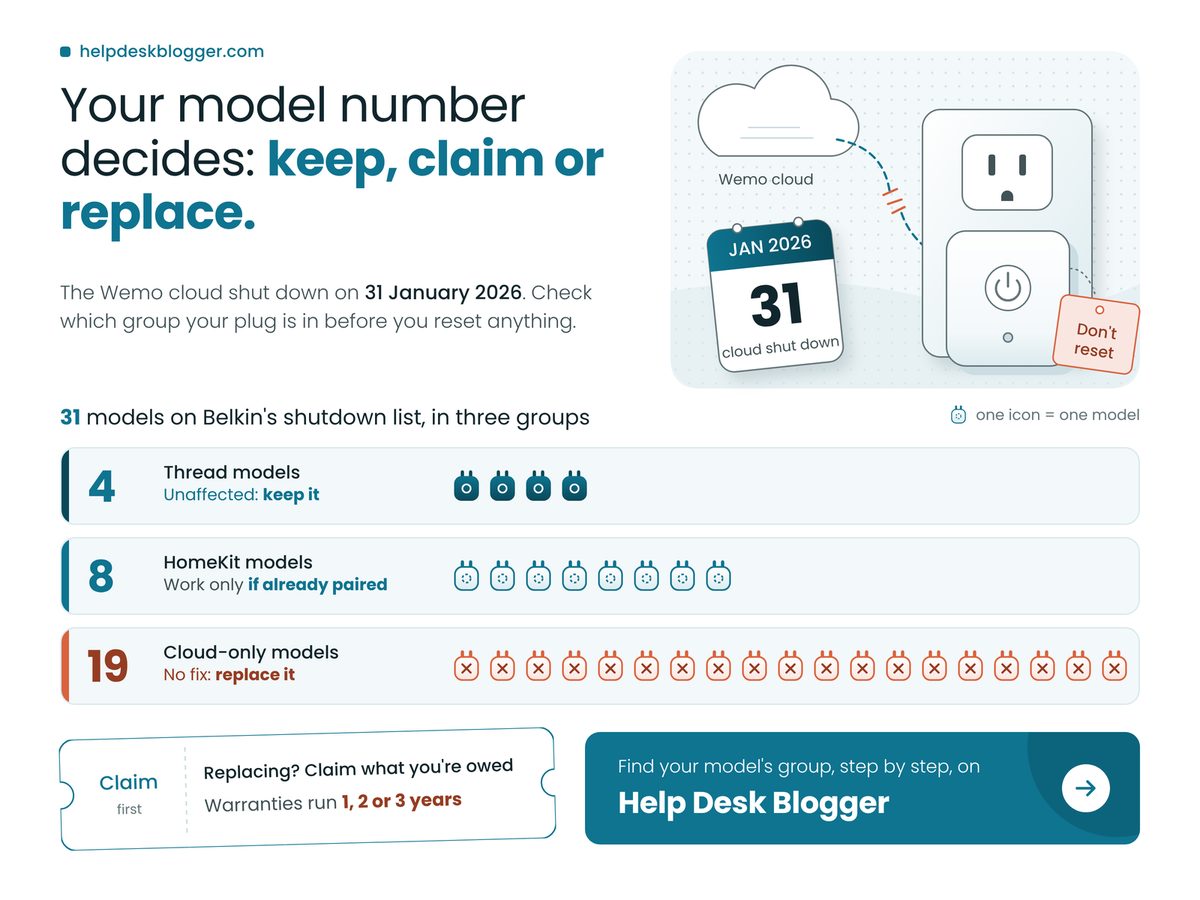
Wemo stopped working chart sorting 31 shutdown models into keep, paired and replace groups

Key Takeaways

Belkin switched off Wemo's cloud on 31 January 2026, so the fix depends on your model number and whether the plug already sits in Apple Home.

  • A plug already paired in Apple Home keeps switching locally; never factory reset it, because re-pairing is no longer possible.
  • The four Thread models are unaffected and need nothing from you.
  • In warranty on 31 January 2026, with a receipt? Claim Belkin's partial refund first.
  • Every other model has no supported fix: replace it with a Matter plug and recycle the old one.

Why did my Wemo plug stop working?

Your Wemo plug stopped responding because Belkin ended Wemo cloud services and app support on 31 January 2026, which also cut remote access and the Alexa and Google Assistant integrations, so your router is not the problem.

That check saves an evening. A dead app or a "device not responding" reply from Alexa is the shutdown working as designed, and no router setting brings either back. The useful question is which Wemo you own: Belkin's end-of-support table sorts its listed models into three fates, and the label's model number tells you yours.

Does Wemo still work with Apple HomeKit?

Yes, if it was already set up: Belkin says HomeKit-configured devices "may continue to function locally via HomeKit", but after 31 January 2026 you can no longer set up a Wemo device with Apple HomeKit at all.

That second half is the trap. A factory reset wipes the pairing, and with setup gone, the plug can never rejoin your Home app. Generic smart-plug advice says reset first. For a Wemo in Apple Home it is the single worst thing you can do. My read, and it is opinion: "may continue" is not a promise. If a future iOS update breaks these plugs, nobody at Belkin will fix them. Treat a surviving HomeKit Wemo as borrowed time, not a reason to buy more.

Belkin is harsher than most. Microsoft at least sold a lifeline when Windows 10 ended, and you can still check whether your PC is covered by Windows 10's extended security updates; Wemo owners get none. The closer parallel is Britain's landline switch-off, which will leave some burglar alarms and telecare devices dead: hardware that works perfectly until the service behind it disappears.

Four numbers decide your next move. The model count is Belkin's; the applet figure comes from GearBrain's January 2026 report that existing Wemo applets stopped running; the other two are our own arithmetic, counted to publication day.

Days Since Wemo's Cloud Shut Down

263 days

Derived; not your router's fault

Cost to Keep a Paired HomeKit Plug

$0

Derived: runs locally, no app

Models on Belkin's Shutdown List

31 models

Your label number decides yours

Wemo IFTTT Applets Still Running

0%

Old schedules need rebuilding

The cost of keeping a paired plug is the figure that should change behaviour. A Wemo in Apple Home needs no Belkin server or subscription to switch, so replacing it early gains nothing. The only thing that can turn it into e-waste is you, holding the reset button down for a few seconds.

"

A Wemo already in Apple Home costs nothing to keep. The reset button is the only thing left that can kill it.

Wemo stopped working: what to do with yours

What you do depends on one check, the model number on the plug's label and whether it already shows in the Apple Home app, and the table below turns that check into a single action per situation.

Read the label, then the Home app, and stop at the first row that fits.

If your Wemo Do this Because
Thread model Keep it; change nothing WSP100, WLS0503, WSC010, WDC010 unaffected
In Apple Home Keep it; never factory reset No new HomeKit setup after 31 January 2026
In warranty File Belkin's refund form Claim needs proof of purchase
Uses IFTTT Rebuild schedules in Apple Home IFTTT dropped Wemo on 1 February 2026
Anything else Buy a Matter plug; recycle this one No supported fix exists

The middle rows stack on top of the others: nothing in Belkin's refund wording mentions HomeKit status, so a paired plug still inside its warranty is worth a claim.

Belkin's listed Wemo models, by what still works

19 8 4 Cloud only: no fix, replace it HomeKit: works only if already paired Thread: unaffected, keep it

If your model falls in the long grey segment, no supported fix exists and it should be replaced; the two shorter segments can stay in service. Counts come from Belkin's Wemo end-of-support table, read on 21 October 2026.

Can I get a refund for my Wemo device?

Yes, if the product was still under Belkin's warranty on or after 31 January 2026 and you have proof of purchase, you may qualify for a refund through the Wemo end-of-support form on Belkin's website.

Belkin's Wemo support page, read on 21 October 2026, says its warranties run 1, 2 or 3 years depending on the model. That gives you a one-minute check, and it is the one to remember: take the order date from your receipt or confirmation email, add your model's warranty term, and see whether the result lands on or after 31 January 2026. Worked backwards (our arithmetic, not Belkin's), that means a 3-year model bought from about 31 January 2023, a 2-year model from 31 January 2024, or a 1-year model from 31 January 2025.

Keep expectations modest. 9to5Google reported in July 2025 that the refund is partial, and that affected products were still on sale as recently as 2023, so a late buyer on a 3-year term is very likely covered. The open question is timing. Belkin states no claim deadline, which is not an invitation to wait; well, technically it is, but nobody wants to be last in a queue a company is winding down. End-of-support notices tend to bury the useful part, much like the Office 2021 end of support pay-or-stay choice did for software.

  • Resetting a HomeKit plug to "fix" it removes it from Apple Home for good.
  • Works at home but not from work? That is the shutdown, not a fault.
  • Delete dead Alexa and Google Assistant routines that name a Wemo.
  • GearBrain recommends Matter plugs as replacements, so look for the Matter logo on the box, not a "works with Alexa" sticker.

Check these before you spend a dollar

  • It appears as a tile in the Home app on an iPhone in your house.
  • You can find the receipt or order email, and its date passes the warranty sum.
  • The model number on its label matches the table's first row.
  • Nobody at home relies on voice control to switch it.

So the decision is simple: keep what still switches, claim what you're owed, replace the rest. This week, turn every Wemo over, write down the model number from its label, open the Home app, and match each plug to its row before anyone touches a reset button.

October 16, 2026

USB Audio Code 10: October Patch Skips It

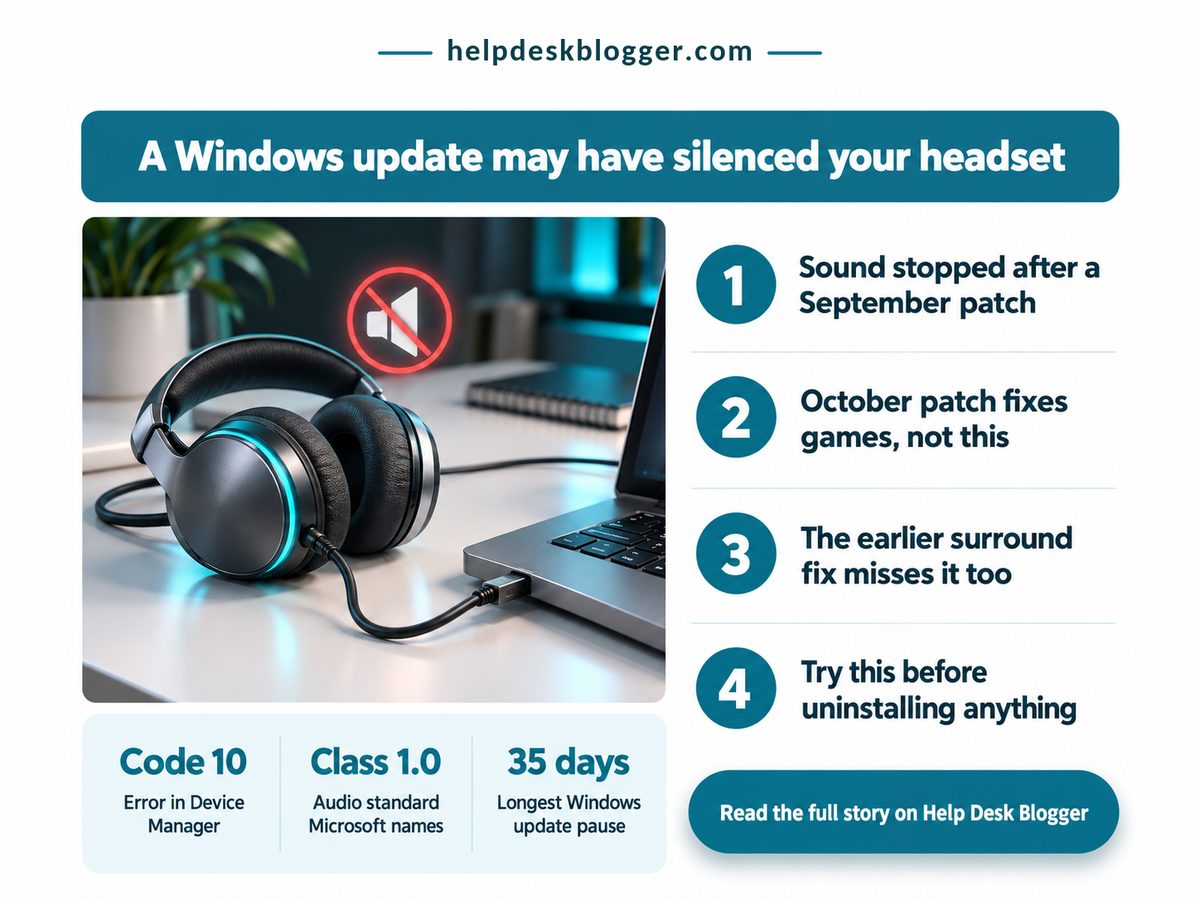
Your USB headset or DAC went silent after an update, and Device Manager says “This device cannot start (Code 10)”. That is USB audio Code 10, and October's patch did not remove it. Start with what costs nothing: unplug the device and use a different USB port. Then, in Device Manager, right-click it, choose Disable device, and enable it again. If sound returns, you are done. If not, the order below stops you wasting an evening on the wrong fix.

Muted USB headset poster explaining USB audio code 10 and the October patch

The October patch does not cure the fault, so stop waiting for it and run the checks in order.

  • Unplug the device, use another USB port, then disable and enable it in Device Manager; it costs nothing.
  • If only surround sound is dead, switch the device to a stereo format.
  • Treat uninstalling the October update as a last resort: it may not undo a fault that began in September.
  • On 24H2 Home or Pro, October was the last update, so plan the move to a newer version.

Does KB5127648 fix USB audio Code 10?

No, KB5127648 does not fix it: Microsoft still lists the USB Audio Class 1.0 fault as mitigated, not fixed, and the October notes repair other things, such as Dolby Digital crashes in older games.

Microsoft's support page says KB5127648 arrived on 13 October 2026 for 24H2, 25H2 and 26H2, with builds ending in 9711. Press Windows+R, type winver and read your build: if it ends in 9711 or later, you already have the patch, so “install the latest update” is not step one.

On 24H2 Home or Pro, October was the version's last update, so nothing later is coming. Our guide to the 24H2 end of support and the one-restart move covers the way out.

According to Techdows, reading Microsoft's known-issues list on 14 October, some USB Audio Class 1.0 devices fail to start or play no sound, and Device Manager reports Code 10. It began with the 8 September update (KB5124008), per GridinSoft's 15 September report. Our rundown of the four faults in that September update covers the others.

The September emergency patch does not help either. KB5129195 (14 September, builds 26100.9457 and 26200.9457) repairs only eight-channel and 3D audio failures on class 1.0 devices that still work in stereo, Redmond Magazine reported on 16 September. So two faults share one complaint, and the cures differ: surround dead but stereo fine, or the device will not start at all.

October's notes do mention audio, which is where people get misled. KB5127648 fixes AC-3 (Dolby Digital) decode crashes in older apps and games, game mouse stutter, Hello fingerprint sign-in after a cold boot and Always On VPN, per Techdows and Windows Report on 14 October. None of that is Code 10. Four numbers decide whether waiting is worth it: how long the fault has been open, what the first fix costs, how many October repairs touch it, and how many patches have cured it.

Days the fault has been open

38 days

Waiting has not fixed it

Cost of the first fix

£0

Settings only, nothing to buy

Fixes reported for KB5127648

4

None touches this fault

Patches that cured Code 10

0 of 2

Both skip this fault

The cost cell is the one to act on: free checks should always run before the ones that remove security patches. Here is where I part company with the usual advice: “just install the latest update” is outdated for this fault, because the latest update is the one that skips it. And Microsoft's “mitigated” is, I think, a fix of sorts, or rather a workaround with a kinder label, when your DAC is silent.

"

Both patches have shipped and neither cures the fault, so the fix is the order of your checks, not the wait for a patch.

How do I fix “This device cannot start (Code 10)”?

Work through the checks in order: swap the port and toggle the device, confirm your build, switch to stereo if only surround is dead, and uninstall only after those fail.

A hwbusters headline reports that Microsoft's only advice for the surround variant is to drop to stereo.

CategoryDetailWhat it means
💰 Cost to try Replug and toggle: free ✅ Costs nothing, so go first
📊 Build number Ends 9711 or later: patched ⚠️ Patched already? Stop waiting
⏱ Fault age Open since 8 September ❌ No fix date found, so do not wait
🔋 Device type Microsoft names Class 1.0 ⚠️ Judge by symptom, not by brand
🛠 Stereo switch Pick a 2-channel format ✅ Fits the surround-only fault
🧾 Uninstall Update history, last resort ❌ May not undo a September fault
🏁 Best suited for Silent device, Code 10 shown 🏁 Rows 1 to 5, then stop

Stop at the first row that brings sound back. If the toggle fails, the generic next step is Roll Back Driver on the Driver tab in the device's Properties. That is standard troubleshooting, not a Microsoft-confirmed cure, so treat it as a free experiment.

No sound, Code 10. Mitigated, not fixed. Stereo fine, surround dead. Fixed by KB5129195. Games crash on AC-3 audio. Fixed by KB5127648. Remote Desktop sign-in error. Not an audio fault.

Match your symptom to a row before you install or remove anything: only the surround fault and the Dolby Digital crash have a published patch. Sources are Techdows, GridinSoft, Redmond Magazine and Windows Report; the sorting is mine.

Should I uninstall the update to get sound back?

Only as a last resort: October's update is cumulative, so removing it may not undo a fault that began in September, and it takes the latest security fixes off your PC with it.

The route, if you must: Settings, Windows Update, Update history, Uninstall updates (Techdows, 14 October). Pausing updates is milder, and Windows allows up to 35 days. Do the sum, though: the fault began on 8 September, so a pause started today ends on 20 November, 73 days in, with no fix date from Microsoft. That is my arithmetic, not a Microsoft figure, and it says waiting out the fault is not a plan.

Whether removing October's update would bring your device back is unknowable from the public notes, and my view is not to trade security patches for a coin toss before the free checks fail.

  • Do not apply a Remote Desktop mitigation to an audio fault: the 0xC000000D sign-in error after KB5124010 is a separate issue, and its mitigation switches Administrator protection off.
  • Do not read an expiry notice as the cause. Office 2021 support also ended on 13 October, which has nothing to do with sound.
  • Do not stack fixes: change one thing, test the sound, then the next.

Key takeaways to act on: which of these is you?

  • Sound returns in a stereo format but surround stays dead: keep the stereo format.
  • Code 10 stays after a second port and a disable-and-enable: try the driver rollback, then weigh the uninstall.
  • Windows will not start at all: use the WinRE option, Uninstall latest quality update.

The decision: keep the update and work around the fault, or remove it. Keep it. This week, replug the device in another port, toggle it in Device Manager, set a stereo format if only surround is dead, and run winver so you know your build when a real fix lands.

October 13, 2026

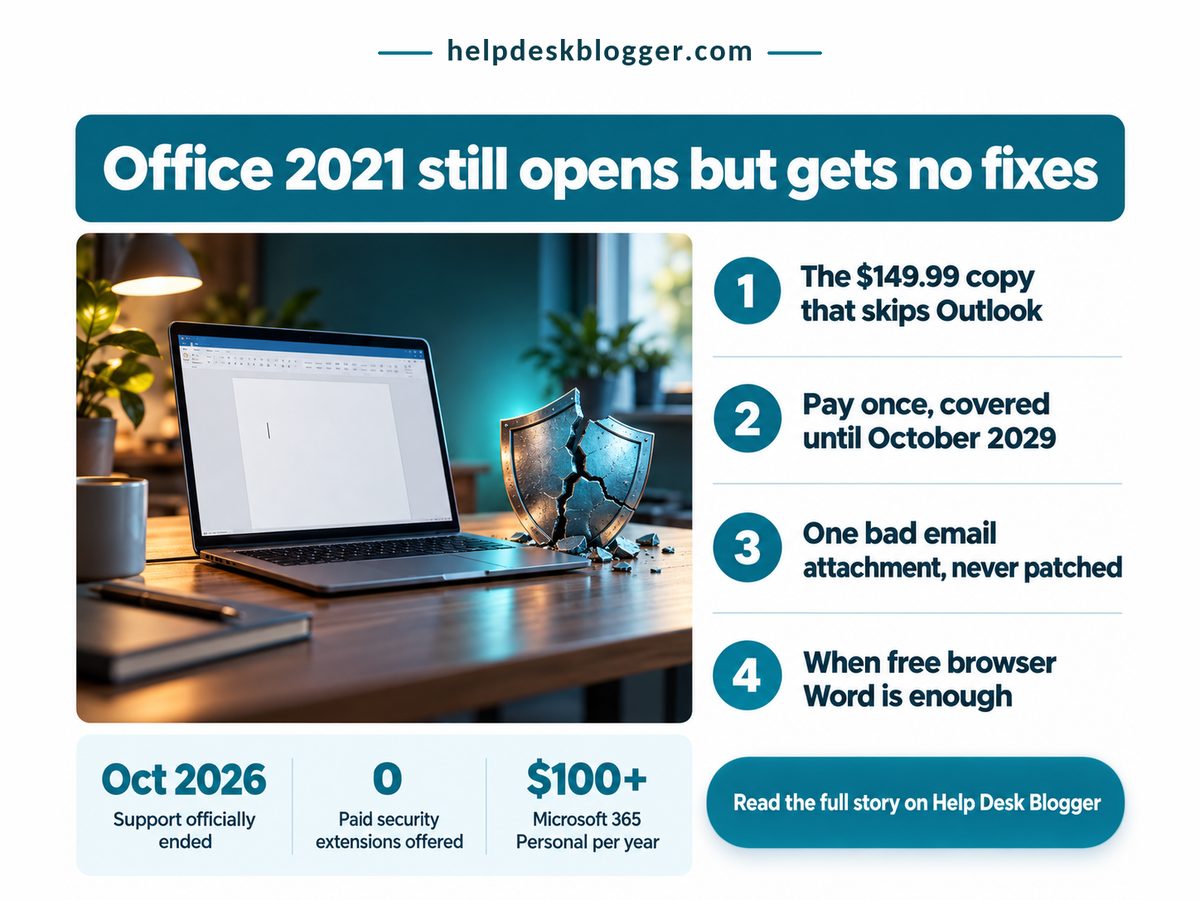
Office 2021 End of Support: Pay or Stay?

"Word opened fine this morning, so is Office 2021 really dead, and do I have to pay for a new one?" Start with the one check that tells you whether this affects you at all. Open Word, click File, then Account, and read the product name under Product Information. If it ends in 2021, the Office 2021 end of support date of 13 October 2026 is yours, and it has now passed. If it says Microsoft 365, you are on a subscription and nothing has changed for you.

Office 2021 end of support infographic showing a laptop, cracked shield and upgrade costs

Still here? Then check what has actually stopped. Nothing on your screen changes. Everything underneath it does.

Key Takeaways: you do not have to pay today, but staying on Office 2021 now means staying unpatched.

  • Office 2021 still opens; fixes and support stopped on 13 October 2026, with no paid extension.
  • On one PC without desktop Outlook, a one-time Office 2024 licence is the cheapest paid exit.
  • Microsoft 365 Personal outspends that licence after about 18 months.
  • Light users can move to the free browser apps and stay patched.

What Office 2021 end of support changes on your PC

The change is invisible: Office 2021 apps still open and save your files, but Microsoft stopped every security fix and every form of technical help for them on 13 October 2026, and it is not selling an extension.

Microsoft's own End of support for Office 2021 notice, updated in June 2026, is blunt: there is "no extension and no extended security updates." That is the sharp difference from Windows 10, where Microsoft does sell extra patches, as our guide to checking your Windows 10 ESU enrolment through October 2027 explains. Here there is no lifeline to buy. Staying means staying unpatched.

In practice the danger arrives by email. A booby-trapped Word attachment built around a flaw found next spring will work against your copy for good, because no patch is coming.

But the notice also says your apps "may continue to function," so panic-buying makes no sense. I'd push back on the usual advice to upgrade immediately: work out which exit fits, then take it within weeks.

It is the second Microsoft deadline in a fortnight, after the Windows 11 24H2 cutoff and its one-restart fix, and the pattern repeats: the software runs while the risk grows.

Four numbers from Office Watch's June 2026 rundown decide which exit is cheapest. They are US list prices; no verified UK price was available at writing, so check Microsoft's UK store before paying.

Office 2024 Support Ends

Oct 2029

About three years of fixes

Office Home 2024, Once

$149.99

No desktop Outlook included

Free Browser Office Apps

3

Patched without paying anything

Microsoft 365 Personal

$100+ a year

Renews every single year

The support date on the replacement matters more than its price. Buying Office 2024 does not end this question, it postpones it to the end of the decade, when the same choice returns.

"

Windows 10 owners could pay for more patches. Office 2021 owners cannot, so every month on the old copy is a month with no fixes at all.

Should I buy Office 2024 or Microsoft 365?

For a single PC, a one-time Office 2024 licence costs less than Microsoft 365 over its support life, even in the Outlook tier, and the subscription earns its price mainly in households sharing three or more PCs.

The table lines up the two paid routes, cost first. Staying put with the free browser apps is the third route, and it sits in the final row.

Dimension Office 2024 vs Microsoft 365 What it means for you
💰 Outlook cost Office 2024 Home and Business, about $100 more
Microsoft 365 Included in every plan
⚠️ Desktop Outlook users need the dearer tier
💰 Three-year cost Office 2024 Paid once, nothing after
Microsoft 365 Personal: $300+ by 2029
✅ One PC keeps roughly half its spend
⏱ Break-even Office 2024 Flat from day one
Microsoft 365 Dearer after about 18 months
⚠️ Decides it if you keep Office past 2028
📊 Several PCs Office 2024 One licence per PC
Microsoft 365 Family: $130+ a year
⚠️ Three or more PCs tilt it to Family
🔒 Security fixes Office 2024 Patched to its end date
Microsoft 365 Patched while you pay
✅ Either route closes the attachment risk
⚖️ Work PCs Office 2024 Your IT team decides
Microsoft 365 Your IT team decides
❌ A personal purchase may be wasted
🏁 Best suited for Office 2024 One home PC, kept for years
Microsoft 365 Three or more home PCs
🏁 Letters and light sums: free web apps

The right-hand column says it plainly: the subscription pays only when shared. My view, against Microsoft's own pitch, is that a one-PC home renting Microsoft 365 just to keep Word patched is overpaying.

Oct 2026. 2021 fixes end. 2027-28. Rumoured Office. Apr 2028. 365 costs more. Oct 2029. 2024 fixes end.

If you expect to still be using Word in spring 2028, buying Office 2024 once costs less than paying for Microsoft 365 Personal year by year. Dates are from Microsoft and Office Watch; the April 2028 crossover is this article's own arithmetic from the two list prices above.

Can I still use Office 2021 after end of support?

Yes, you can keep using Office 2021 for as long as it runs, but it is only a sensible choice on a home PC where you rarely open attachments from strangers and already have a plan to move.

The quiet winner for many readers is the free browser versions of Word, Excel and PowerPoint, patched by Microsoft on its own servers. They lack some desktop features, which rarely matters for letters and a household budget.

Waiting sounds clever and mostly isn't. Office Watch calls a new one-time Office "likely but not confirmed," so you would be betting on an unannounced product while unpatched. Patches misfire too, as the Windows 11 September update faults showed, but a buggy fix beats no fix, or at least it does once the follow-up lands.

  • On a shared family PC, anyone's careless click hits your unpatched copy.
  • On a work or school laptop, Microsoft says follow your IT department.
  • If a reinstall fails to activate, no Microsoft support line will help.
  • Holding out for the next one-time Office means waiting unpatched.

Check these about your own setup before you pay anything

  • Strangers' attachments reach you weekly: move off Office 2021 this month.
  • You use desktop Outlook daily: price Home and Business, not Office Home.
  • Three or more people at home need their own PC: price Microsoft 365 Family.
  • An employer or school issued the laptop: ask IT first.
  • None apply: run the browser apps for a fortnight before spending.

Pay or stay? For most single-PC homes the answer is pay once or go free, not subscribe. Tonight, open File, then Account in Word, and if the name ends in 2021, pick your exit before the weekend: browser apps for light use, Office 2024 for one PC, Microsoft 365 only for a shared household.

October 5, 2026

24H2 End of Support: The One-Restart Fix

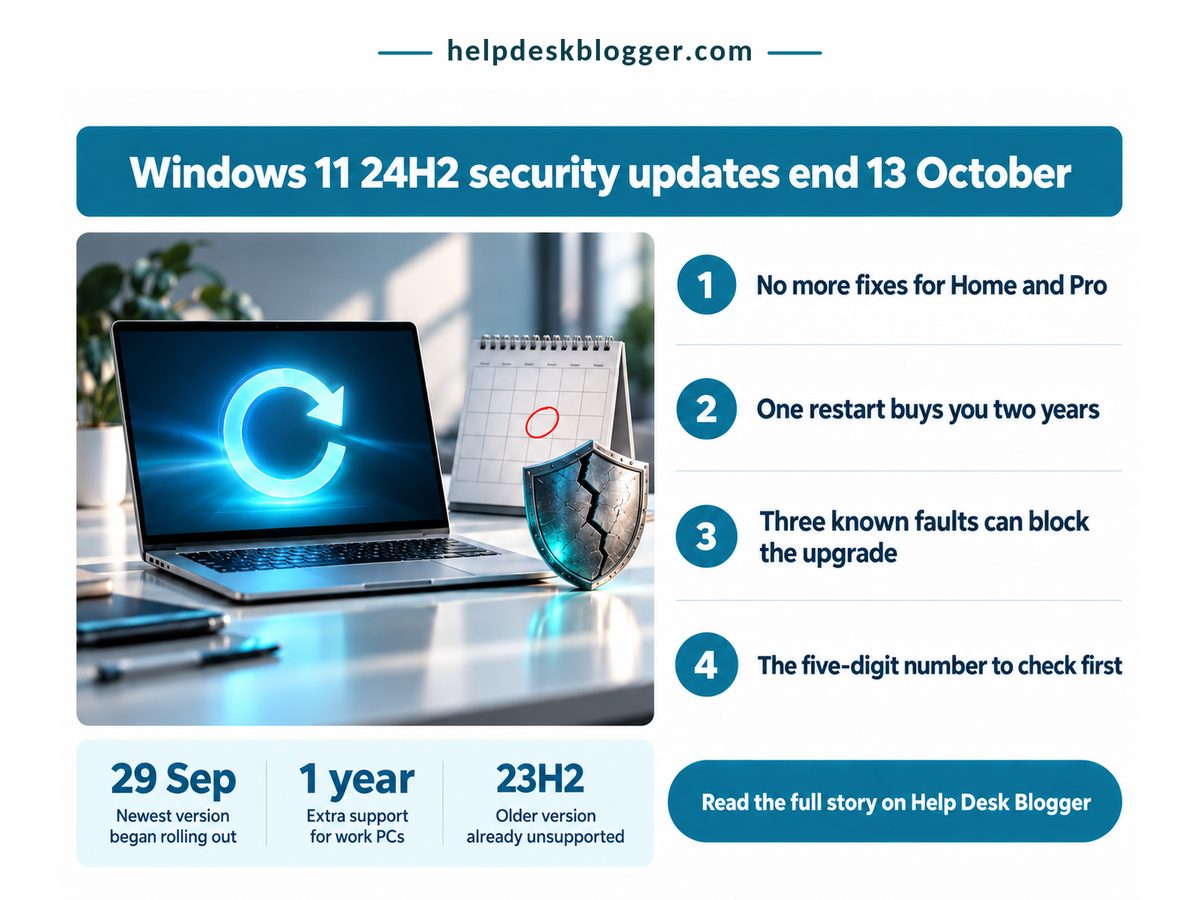
Your PC says 24H2. Windows Update says you're up to date. And somewhere you read that something ends on 13 October, which is next Tuesday. That date is the 24H2 end of support deadline for Home and Pro editions, and for most machines the fix is one restart, not a reinstall. Here is the check order, fastest first.

Infographic on 24H2 end of support: laptop, restart arrow, calendar and four checks

Key Takeaways

If winver shows a build starting 26100 on Home or Pro, install 26H2 this week: one restart buys two more years of fixes.

  • 24H2 Home and Pro lose security fixes after 13 October 2026; Enterprise and Education get another year.
  • 26H2 covers you roughly twice as long as 25H2 for the same single restart.
  • A build starting 22631 is 23H2 and needs the full upgrade, not the quick one.
  • USB audio, Credential Guard or virtual desktop users should check Microsoft's release health page first.

How do I check if my PC is on 24H2?

Press the Windows key and R, type winver, press Enter, and read the build number: if it starts 26100 you are on 24H2, and the security clock on your PC runs out next Tuesday.

Only the first five digits matter. Microsoft's release health page lists the newest 24H2 build as 26100.9550, from 22 September, so anything beginning 26100 is 24H2 however recently it was patched. That's the trap: a fully patched 24H2 machine looks healthy right up to the day the updates stop.

Next, the edition, named in the same box. On Home or Pro, 13 October 2026 is the last Patch Tuesday that reaches you. Enterprise and Education editions of 24H2 get fixes until 12 October 2027, per the same Microsoft page, so a work laptop has another year while the personal Pro machine beside it does not. Edition decides urgency, not age.

Then Windows Update. In Settings, check that updates aren't paused and that the toggle for getting the latest updates early is on. Nothing breaks on the day. Well, nothing you'd notice: the PC boots, apps open, and every flaw found after that Tuesday stays open on your machine.

If last month's patch made you pause, see our guide to Windows 11 September update problems and what KB5129195 fixes: none is a reason to stay on 24H2. An older Windows 10 machine has more room, because Windows 10 extended security updates now run to October 2027, if enrolment went through.

Four numbers decide whether this is a five-minute job or a weekend one. The date comes from Microsoft's Windows 11 release information page and the single restart from TechRepublic's 2 October report; feature updates are free, and the last figure is our own arithmetic on Microsoft's end dates.

Last Home/Pro Update

13 Oct 2026

Later flaws stay open

Price of Moving to 26H2

£0

Nothing to buy or renew

Restarts Needed From 24H2

1

No wipe, no reinstall

25H2 Cover vs 26H2

50%

Half the time, same reboot

The restart figure is the one people doubt. Newer versions reach a 24H2 PC as an enablement package, a small update that switches on features already on your drive. Files, apps and settings stay put.

"

Next Tuesday is not a reinstall deadline. It is a one-restart deadline, and that same restart can buy two years of fixes instead of one.

Should I skip 25H2 and go straight to 26H2?

Yes for almost every home PC on 24H2: 26H2 installs the same way as 25H2, with one restart, but its Home and Pro support runs a full year longer.

The usual advice is to take whatever Windows Update offers. This month that advice is out of date: TechRepublic's August and October reports say Microsoft's automatic route for home PCs leads to 25H2, while 26H2 arrives gradually. Accept the default and you get the shorter of the two.

Dimension 25H2 vs 26H2 What it means for you
💰 Cost and effort 25H2 Free, small download
26H2 Free, small download
✅ Same job either way, so pick on length
⏱ Updates stop 25H2 12 Oct 2027
26H2 10 Oct 2028
✅ Your next deadline lands a year later
📊 Build in winver 25H2 26200.x
26H2 26300.x
✅ Confirms the restart actually took
🌍 How it arrives 25H2 Pushed to home PCs
26H2 In waves since 29 Sep
⚠️ Waiting usually hands you the shorter one
🧾 From 23H2 25H2 Full upgrade only
26H2 Full upgrade only
❌ No quick enablement route for you
🏁 Best suited for 25H2 PCs a safeguard holds back
26H2 Any home PC on 24H2 today
🏁 Most readers should take 26H2 now

Read down the right-hand column and the choice makes itself. Only timing and 23H2 push back, and timing has a manual fix: if Windows Update hasn't offered 26H2, Microsoft's Installation Assistant installs it now.

735 days. Full ring is 26H2. Stay on 24H2: 7 days. Move to 25H2: 371 days. Move to 26H2: 735 days. Days of security fixes left, counted from 6 Oct 2026.

Going straight to 26H2 roughly doubles what 25H2 gives for the same restart, so don't stop halfway. Days counted by Help Desk Blogger from 6 October 2026 to Microsoft's published Home and Pro end dates.

What can block the 24H2 end of support fix?

Three known compatibility problems can hold a PC back from 26H2, and an older 23H2 install cannot take the quick route at all, so check both before you assume Windows Update is broken.

Microsoft blocks the upgrade where it knows something will break, a safeguard hold. As of 3 October, TechRepublic counted three, covering USB audio devices, Credential Guard and virtual desktop setups. If you record through a USB audio interface, that first one is about you.

Here's where I part company with the forums, which treat forcing past a hold as the obvious move. My view: if your income runs through that interface, take 25H2 now and let 26H2 follow once the hold lifts. A dead recording setup costs more than a second restart next year. That's opinion, and Microsoft hasn't said when the holds clear.

The other dead end is 23H2. Its Home and Pro editions are already out of support, and its latest build is 22631.7584, so a reading starting 22631 means the enablement package won't apply. You need the full feature update, and free space on an ageing drive starts to matter. If it's tight, our look at whether to buy RAM and SSD upgrades now or wait in 2026 covers what a replacement costs.

  • A pause that runs past 13 October holds you on an unsupported build until it expires.
  • A held PC looks like one not yet offered; Microsoft's release health page tells them apart.
  • Work PCs follow your IT team's schedule; ask first.
  • Back up anyway: one restart is normal, not promised.

Install 26H2 this week if all of these are true:

  • winver shows a build starting 26100 and the edition line says Home or Pro.
  • You rely on no USB audio interface, Credential Guard or virtual desktop.
  • The PC is yours, not your employer's.

Take the slower route if your build starts 22631 or a hold keeps 26H2 off your PC.

So here's the job: open winver tonight, and if the build starts 26100, install 26H2 from Windows Update before next Tuesday's final 24H2 patch.

Related: Office 2021 end of support landed the same day, so check whether your copy is still patched

Related: check your Secure Boot certificate after the Windows 11 24H2 cutoff

September 28, 2026

UK Landline Switch Off: What Goes Dead

"The home phone has had no dial tone since the broadband engineer came, and Mum's alarm box keeps blinking." That is the landline switch off arriving early. Providers are moving every UK line from copper to Digital Voice, and kit built for copper can fail quietly. Check in this order: the plug, the power, then the provider.

Telecare alarm beside a broadband router ahead of the landline switch off

Start at the wall. A BT-style plug or small RJ11 jack means the device leans on copper and is at risk. A wider RJ45 plug means it already uses broadband. A power lead alone usually means a built-in SIM, which the change leaves alone. HomeCareGuardian's August 2026 telecare guide uses the same test.

Anything still using the copper line stops connecting after 31 January 2027, so test your alarms and phone now, not when a letter arrives.

  • A BT plug or RJ11 jack means copper; RJ45 or a built-in SIM is usually safe.
  • Providers must confirm a telecare alarm works before moving that home, so tell them the alarm exists.
  • Digital Voice does not need full fibre; treat any upgrade sold as mandatory as an upsell.
  • A router-fed phone goes quiet soon after a power cut, so keep a mobile charged.

Why does the landline switch off break working kit?

Digital Voice carries your calls as internet data through the router, so anything that expects the old copper line's signal or its power, such as older burglar alarms and telecare units, can lose its connection without any warning light.

Copper carried a small current of its own, which is why a corded phone worked through a storm. Digital Voice sends the call as data through the router, and the router needs mains power. Uswitch's explainer, updated August 2026, lists burglar alarms, CCTV, card terminals and telecare among affected kit, and confirms full fibre is not needed: ordinary broadband, SOGEA included, carries the calls. So the router is now your phone socket, and its power matters more than its speed (our comparison of Wi-Fi 7 and Wi-Fi 6E home routers covers speed).

The weak link is paperwork, not technology. Providers are meant to find vulnerable customers before moving them, and they miss some, as Ofcom's December 2025 penalty on Virgin Media and an August 2025 Which? survey of telecare firms show. The time figure below is our own count of days to the cutoff.

Days Left to Test

125 days

Start this weekend, not January

Ofcom Fine on Virgin Media

£23.8m

Providers can miss your alarm

Telecare Users Virgin Had to Trace

42,991

Missed by one provider alone

Telecare Firms Selling Analogue-Only

3 in 7

Check before buying any alarm

If you are shopping for a parent, act on the Which? finding: get the seller to confirm in writing that the alarm works on Digital Voice or has its own SIM. The same habit applies to any connected gadget, as our look at what works and what still breaks in Matter smart homes found.

"

A provider big enough to earn an eight-figure fine still lost track of telecare customers. Assume yours has not spotted your alarm until you say so.

Copper line vs Digital Voice: what changes at home

Digital Voice keeps your number and your handset but moves the dependency from the copper line to your router, so plug type, power and the telecare rules decide whether each device keeps working after the cutoff.

Left column: the question. Middle: how each network handles it. Right: what to do. Rows run from cost to risk.

Dimension Copper vs Digital Voice What it means for you
💰 What you need Copper A copper voice line
Digital Voice Any broadband, SOGEA too
✅ No full fibre contract to buy
⏱ Deadline Copper Ends 31 Jan 2027
Digital Voice Default for every line
⚠️ About 18 weeks left to test kit
📊 Plug check Copper BT plug or RJ11 at risk
Digital Voice RJ45 or SIM-only is fine
✅ Sorts each device in a minute
🔋 Power cut Copper Line powers a corded phone
Digital Voice Ofcom floor: 1 hour for 999
❌ Longer cuts need a charged mobile
⚖️ Telecare rights Copper Nothing to arrange
Digital Voice No move until alarm works
✅ You can hold your own migration
🛠 Other kit Copper Dial-out alarms, card readers
Digital Voice Needs an IP or 4G SIM model
⚠️ Ask each maker, not your ISP
🏁 Best suited for Copper Nobody after the cutoff
Digital Voice Kit that passed the plug test
🏁 Anyone who has run the checks above

All ticks and you are done. One cross, usually the power-cut row, means a router battery pack or a mobile kept charged, both far cheaper than a panic engineer visit in the final week.

Housing provider digital telecare upgrades, February 2026. Finished: 25%. Not expected in time: 67%. Middle: a further 8% expect to finish in time.

If an alarm in your family comes through a housing provider, assume it is not upgraded yet: two in three providers do not expect to finish before the cutoff. Source: Housing LIN and Appello survey, February 2026, via HomeCareGuardian; the middle and right bands are our derivation from its one-third forecast.

What happens to my phone in a power cut on Digital Voice?

Your home phone stops working once the router loses power, unless the router has battery backup, and Ofcom only requires providers to offer enough backup for a short spell of emergency calls, not a night without electricity.

The GOV.UK Telecare National Action Plan, published February 2025, says analogue telecare units typically run 12 to 24 hours on their own battery, and alarms without one fail in a power cut outright. But on Digital Voice that battery only counts while the router is alive, so a unit good for a day goes deaf when the hub does. That is our reading of the two rules together, and it puts the backup question on the router.

The plan's Charter says providers will not migrate a telecare user until "a compatible and functioning telecare solution" is confirmed. My view: sound on paper, but only if the provider knows the alarm exists. Tell them yourself (or, more accurately, get whoever pays the bill to), and if brushed off, call Ofcom on 0300 123 3333. Then check any reassuring letter, as you would when verifying Windows 10 ESU enrolment.

  • A burglar alarm that dials out over the phone line: ask the installer for an IP or SIM communicator.
  • A router on a timer plug or an extension lead that gets switched off at night.
  • Sheltered or social housing: the landlord usually owns the alarm, so ask them for the upgrade date.

Key takeaways to act on: you are ready when all of these are true

  • Every device you rely on plugs into the router, uses an RJ45 socket or runs on its own SIM.
  • Your provider has confirmed in writing that it knows about any telecare alarm in the home.
  • You know where a charged mobile is if the power goes at night.
  • If you rent, your landlord has given you a date for the alarm upgrade.

This weekend, do the plug test on every device, then phone your provider with two questions: your migration date, and whether a telecare alarm is flagged on your account. If the second answer is no, the job is yours.

Related: what to check when your Wemo stopped working after Belkin's cloud shutdown