Windows Security shows a green tick beside Secure Boot, yet every headline says a certificate ran out. Both can be true, and that gap is the whole problem. Microsoft's Windows Production PCA 2011 expired on 19 October 2026, and the secure boot certificate that replaces it may or may not be on your PC. You can find out in about a minute, in three places, checked in order.
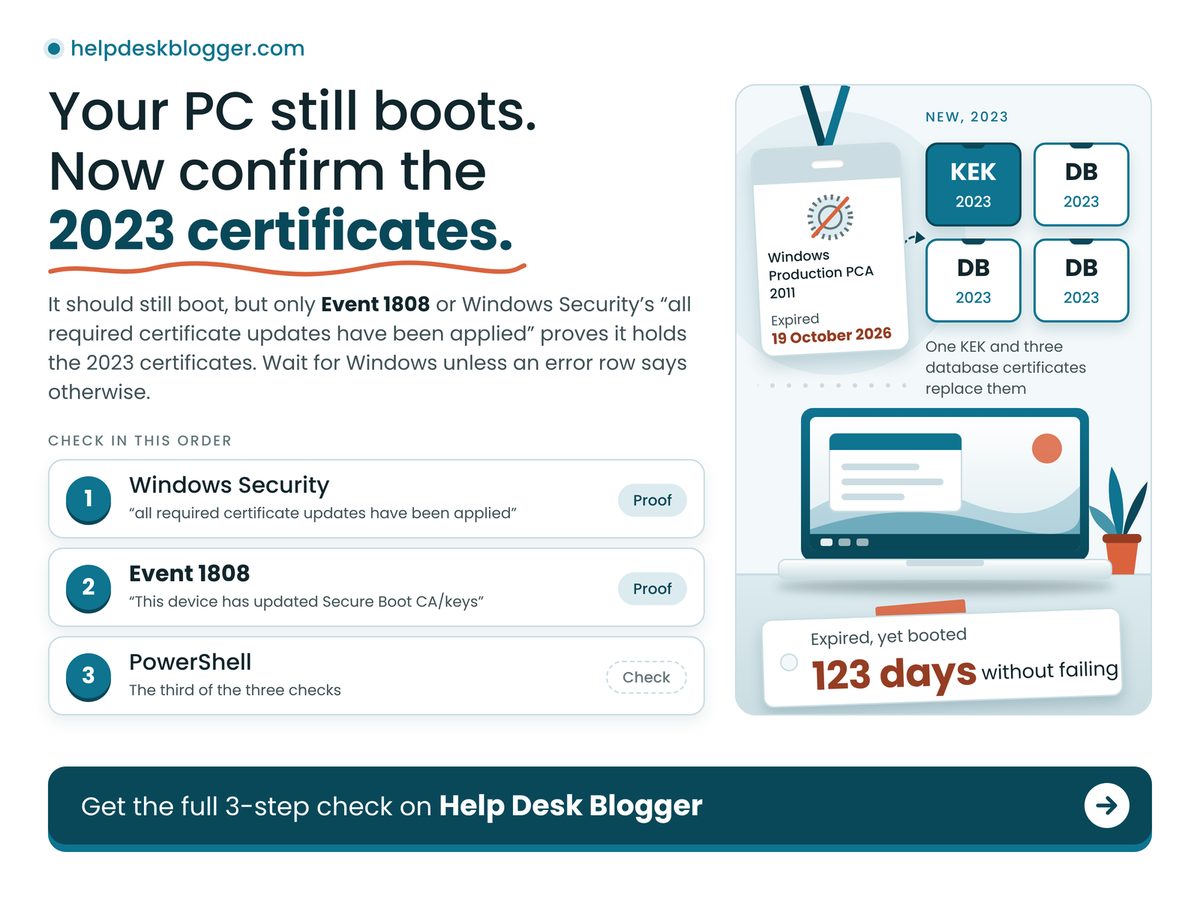
TL;DR: Your PC should still boot, but only Event 1808 or Windows Security's "all required certificate updates have been applied" proves it holds the 2023 certificates.
- Read the words in Windows Security, not the colour of the tick.
- Event 1808 means finished; Event 1801 means staged but not yet in the firmware.
- A missed update costs future boot-level protection, not today's startup.
- Save your BitLocker recovery key before any firmware update.
How do I check if my PC has the Secure Boot certificate update?
Run three checks in order and stop at the first clear answer: the exact wording in Windows Security, Event 1808 or 1801 in Event Viewer, then one registry value read in PowerShell.
- Windows Security. Open Device security, then Secure Boot, and read the sentence under the badge. On Microsoft's status page, "all required certificate updates have been applied" means no action, while "older boot trust configuration" means install updates and restart.
- Event Viewer. In the System log, filter for source TPM-WMI. Event 1808, "This device has updated Secure Boot CA/keys," is the all-clear. Event 1801 means certificates updated but not yet applied to firmware, per Microsoft's events list.
- PowerShell. In an administrator window, run
Get-ItemProperty HKLM:\SYSTEM\. Microsoft's registry page treats Updated with an error of 0 as finished; NotStarted or InProgress means not yet.CurrentControlSet\ Control\ SecureBoot\ Servicing | Select-Object UEFICA2023Status, UEFICA2023Error
That is the one-minute check to run on your own PC tonight, and step one alone is not enough. Malwarebytes wrote on 28 May 2026 that a green checkmark alone does not confirm the new certificates were applied. An asker on Microsoft's Q&A site wanted to know how to confirm the fix had worked, which says plenty about the signal, or maybe just how many people share the question.
Will my PC still boot now the 2011 certificates have expired?
Yes: Microsoft says devices without the 2023 certificates continue to start and operate normally, and ordinary Windows updates still install, so an expired date alone does not lock you out.
What stops is the early-boot side. Microsoft states that such a PC can no longer receive new Boot Manager updates, Secure Boot database and revocation-list updates, or fixes for newly found boot-level flaws. Our reading: maintenance, not emergency, but with no natural reminder, so it gets skipped. The fix arrives through Windows Update, so confirm your build with the Windows 11 24H2 winver check, and if updates keep failing, start with the September Windows 11 update problems.
Worked example: a Windows 11 PC with Secure Boot on has never logged Event 1808, and still holds its factory 2011 certificates. Today is 25 October 2026. The key-exchange certificate expired on 24 June 2026, so 24 June to 24 October is 30 + 31 + 31 + 30 = 122 days, plus one to reach today: 123 days. That PC has booted through 123 days of an expired certificate without failing, so expiry alone is not the risk; the missing 2023 certificates are.
Four numbers frame the urgency, and the retry schedule comes from Microsoft's troubleshooting guide.
Time Since Last Expiry
6 days
Derived: nothing broke on day one
Expiry Dates Now Behind You
3 deadlines
No date left to wait for
Update Task Retry Interval
12 hours
Windows keeps retrying without you
Recovery Keys To Locate First
1 key
Needed if BitLocker prompts
The retry cadence makes patience a fair first move: a PC showing Event 1801 may simply be mid-way.
Expired does not mean broken. The real cost of skipping this is every boot-level fix Microsoft ships from here on, not this morning's startup.
What does each result mean, and what should I do?
Find your row and read across: 1808 means finished, 1801 means restart and recheck, errors 1795 and 1796 point at the firmware, and 1032 means pause BitLocker first.
| If you see | Do this | Because |
|---|---|---|
| Event 1808 | Nothing. You are done. | Firmware holds the 2023 certificates |
| Event 1801 | Restart, then recheck | Staged, but not yet in firmware |
| Errors 1795, 1796 | Look for an OEM BIOS update | Firmware refused the write; Windows retries |
| Event 1032 | Suspend BitLocker first | Update would trigger recovery mode |
| Nothing logged | Install updates, restart, recheck | Task runs at startup and repeatedly |
Only the error rows need a human: Microsoft says to contact the device maker for 1795, and 1032 sits with your BitLocker setup.
Three of the four new certificates go into the Secure Boot database and one into the key list that authorises database changes, so a PC that finished one step is not finished. Derived from the certificate table on Microsoft's expiry page: one KEK 2K CA 2023 and three database certificates, led by Windows UEFI CA 2023.
Does the Secure Boot update trigger BitLocker recovery?
It can: Microsoft logs Event 1032 when your BitLocker setup would trigger recovery mode if the update were applied, and its fix is to suspend BitLocker for two restarts, then turn it back on.
Microsoft also notes a device may ask for the recovery key once after the update; enter it and check for firmware updates. Windows Latest reported on 26 May 2026 that HP had acknowledged a BIOS update leaving some commercial PCs in a BitLocker recovery loop, with the 2023 certificates failing to install meanwhile. Our call: treat every firmware update on a BitLocker PC as a recovery-key moment, and store the key somewhere that is not that PC.
One poster on Microsoft's Q&A forum described a status stuck at InProgress with events 1796 and 1801 repeating, an update that keeps retrying and never lands.
- Secure Boot off. A PC in legacy BIOS or CSM mode, Malwarebytes reports, sits outside this update.
- Reset to defaults. Microsoft says avoid it unless the maker's defaults include the 2023 certificates.
- Dismissed warnings. Dismiss installs nothing, and Microsoft calls it not recommended.
- Windows 10. Microsoft's expiry page lists Windows 10 22H2, so run the same three checks; patch timing is in the Windows 10 ESU extension to October 2027.
Stop and ask the maker before changing anything if:
- Your PC is an HP commercial model with a BIOS update waiting.
- You cannot say where your BitLocker recovery key is saved.
- Windows Security shows the red stop icon and mentions the manufacturer.
- UEFICA2023Error still holds a non-zero number after several restarts.
The decision is whether to wait for Windows or step in yourself, and for most PCs it is wait. Tonight, run the three checks. At Event 1808, close the laptop. Otherwise install updates, restart, recheck tomorrow, and touch firmware only once your recovery key is saved off the PC.
How we checked this
We read four Microsoft pages: the certificate expiry page (change log to 18 May 2026), the Secure Boot events list, the Windows Security status page (revised 3 April 2026) and the registry key page (change log to 20 March 2026). The worked example is our own date arithmetic, assuming the PC kept its 2011 certificates. No PC was tested hands-on for this article. Last verified: 25 October 2026.
Edited by Ragu, reviewed after publication. Spotted something out of date? Tell us and we will correct it.
No comments:
Post a Comment
Note: Only a member of this blog may post a comment.